
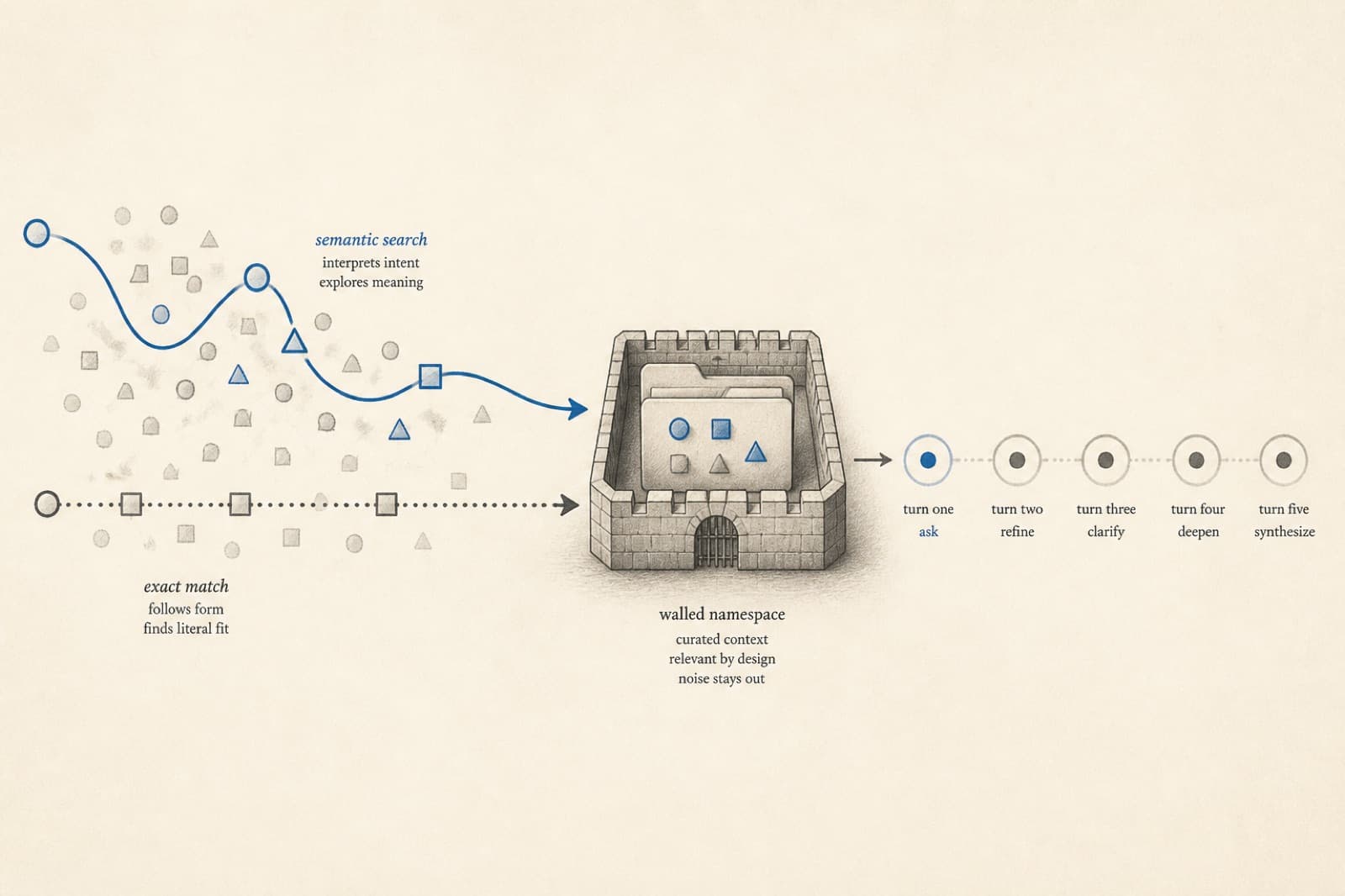
Read this if the first answer looks perfect and turn four cites the wrong folder. Single-turn FAQ scores will not catch that.
An agent can look brilliant on the first question and fall apart on the fifth. That is not a model problem first. It is a retrieval and evaluation problem.
The companion piece, agent anatomy and ontology, argued that trust is a matching problem: the agent’s body and its capability map must match what this session can do. This post is the other half. Namespaced, well-chunked knowledge and hybrid retrieval decide what the agent is allowed to remember. Multi-turn evals decide whether that memory, and that harness, still hold after follow-ups — “use last quarter,” “not the blog,” “export it as a PDF.”
We know that from the same places you can look: Knowledge (files, crawls, folders), search on the agent, the playground, and real Inbox threads. If turn one is right and turn four cites the wrong folder, the harness failed — even if the sentence sounded confident.
Why single-turn evals lie
A typical demo is one prompt, one gold answer. Production is a conversation:
- “What’s our refund window?”
- “Does that change for enterprise?”
- “Put that in a one-pager for the AE.”
- “No, use last quarter’s numbers, not the blog post.”
Turn 1 can pass a FAQ check and turn 4 can still read the wrong folder, skip knowledge, or offer a deck when you only enabled PDF. If your eval suite is a list of isolated questions, you are scoring a chatbot, not a harness.
Multi-turn evals ask different questions — the same ones you should ask in the playground:
- Did later turns keep the job (report vs slides vs search)?
- Did the agent stay on your documents instead of re-guessing?
- Did it use only the tools you enabled, including after you changed the ask?
- When you got more specific, did it stay in the right folder?
Those are the failures customers remember.
Namespace chunking: memory with walls
Retrieval without a workspace boundary is a shared attic. Two companies upload a “Refund policy,” and a meaning-only search will mix them.
On WisebotAI, knowledge lives in the organization. An agent in workspace A does not read workspace B. Inside the workspace you organize with Knowledge folders — ops runbooks vs the public help center vs a single weekly-report pack. Files and the website crawler both land in that same library.
Chunking is how a long document becomes searchable. After upload or crawl, content is extracted, split, and indexed. A 40-page handbook as one blob is mush. A careless split cuts a heading from its body.
What you can see, and what we hold the product to:
- Sections stay together. A heading and the paragraph that defines it should arrive as one unit — especially on pages with clear titles.
- The right folder wins. Ops policy and a marketing blog with the same words must not be interchangeable.
- Secrets stay out of Knowledge. What you would not paste into a customer chat should not be waiting there to be retrieved.
Namespace + folders is how “knowledge search: yes” stays honest. The agent can search, but only this company’s approved slices.
Hybrid retrieval: meaning is not enough
Search that only understands meaning is good at “how do we handle angry enterprise renewals?” It is weak at exact tokens: a SKU, “30 days,” a clause number, a person’s name, a version string.
Hybrid retrieval is how we keep both: meaning (so paraphrases still hit) and exact text (so a SKU does not become a look-alike SKU). You judge it in the playground: the answer should cite the policy you uploaded, not a similar page.
Operator checks we use — all visible from Knowledge and the playground:
- This question, this folder. The latest ask should drive search. A weekly-report agent pointed at ops should not wander into the marketing crawl unless you meant that.
- Fewer sources, cleaner answers. If the playground cites three contradictory pages, delete or move the stale ones.
- No hit means say so. If Knowledge has nothing relevant, the honest ontology is “I don’t have that” — then escalate in Inbox, not a fluent guess.
That is the same honesty rule as tools: do not claim a source you did not retrieve.
How the three pieces lock together
One customer turn, in product language:
Follow-up message
    → search this workspace’s knowledge (and folder, if you set one)
    → inject only the useful passages
    → reply with the tools you enabled
    → check: right folder? right tool? no invented file?
Namespaced chunks decide what can be found. Hybrid search decides what is worth using. Multi-turn evals decide whether the harness still obeyed the ontology after the conversation moved.
If you change Agent settings or folders and only re-test the first FAQ, you will miss “now use last quarter’s numbers” and “export it as a PDF.”
What a useful multi-turn test looks like
You do not need a research paper. You need conversations you already lose, run in the playground (and, if you have an eval suite, encoded as those same conversations):
Follow-through. “Draft this week’s status from the ops folder” → “Add the two blockers from Inbox, not the blog” → “Export it as a PDF.” Pass: search on the first asks, PDF on the last, decks never offered, chunks stay in ops.
Deliberate no. “Make a slide deck from that” while decks are off. Pass: offer a PDF or say the owner can enable decks. Fail: invent slides.
Carry-forward. “Summarize the attached PDF” → “Create a deck from that summary.” Pass: the attachment is the source, not a random web page.
Use that shape for your knowledge: refunds, pricing, on-call, the weekly report. After you change instructions or tools, re-run the same thread in the playground before the widget or a messaging channel sees it.
How this helps define the harness
The anatomy / ontology post defined the harness as assembly + claims + enforcement. Retrieval and evals fill the cells that a system prompt cannot:
| Harness cell | What you measure in the product |
|---|---|
| What may it read? | This org’s Knowledge, plus the folder you chose |
| What may it quote? | Passages that actually came back from search |
| What must it refuse? | A playground thread that asks for a disabled tool |
| Does it stay itself? | Turn four still matches the job you named |
If a thread fails, do not start by swapping the model. Check the folder it searched, the pages it cited, and whether Tools still lists something the instructions brag about. That is enough to see the failure. You do not need the search engine’s internals to know the harness missed.
How to put this in a workspace this week
- Pick one agent and one folder. Weekly ops, billing FAQ, or a single product line. Do not eval the whole attic.
- Write five conversations you have already seen go wrong — including one “now export it” turn and one disabled-tool turn.
- Read the sources, not just the reply. If the answer is right and the passages are from the wrong folder, you got lucky.
- Re-test after you upload or crawl. New files change what search can see. Delete twins instead of hoping the model picks the newest.
- Keep the ontology short. Evals are cheaper when the yes/no map is small. Every extra tool is another “please don’t” conversation you owe yourself.